WordPress Security • Technical SEO
Why Is My WordPress Site Indexed in Japanese? A Technical Incident-Response Guide
If your WordPress site suddenly shows Japanese titles in Google results, you are likely not dealing with a simple SEO issue. In most cases, this is a compromise pattern commonly called a Japanese keyword hack: malicious pages are injected and served selectively to crawlers, while normal users still see a clean site.
This guide gives you a practical workflow to confirm the incident, identify where injections live, clean the environment safely, and reduce reinfection risk.
1. Confirm the scope fast
Start by measuring impact before touching files. You need to know whether this is isolated to a few URLs or spread across templates and generated routes.
- Search Google with site:yourdomain.com and look for Japanese or spammy snippets.
- Check Google Search Console for unknown indexed paths and unusual query language shifts.
- Collect 5-10 suspicious URLs and save their SERP title/description as evidence.
- Verify if the suspicious URLs return 200 status and whether they are linked from your XML sitemap.
2. Detect cloaking behavior
Japanese keyword incidents often include cloaking. The payload may be shown to bots while remaining hidden to normal browsers.
Compare the same URL under different user agents and network contexts. If response body, redirects, canonical tags, or rendered DOM differ significantly, treat it as active cloaking.
curl -A "Mozilla/5.0" -I https://yourdomain.com/suspicious-url
curl -A "Googlebot/2.1 (+http://www.google.com/bot.html)" -I https://yourdomain.com/suspicious-url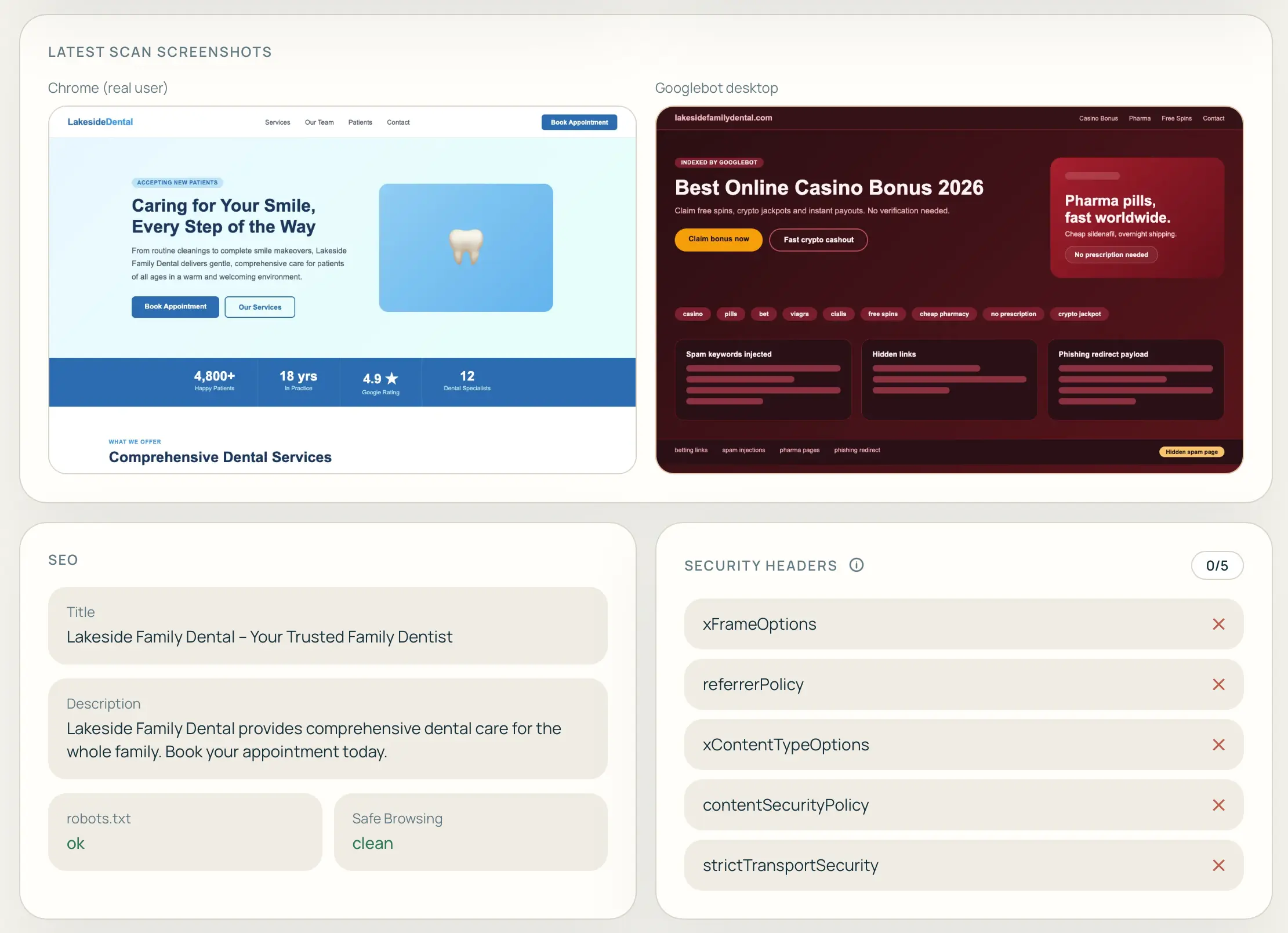
3. Investigate likely infection points
Prioritize high-frequency persistence points in WordPress compromises.
- Theme files:
functions.php,header.php, and template partials. - Must-use plugins: unexpected files in
wp-content/mu-plugins. - Uploads directory: executable PHP in year/month upload folders.
- Database options: injected payloads in
wp_options(autoloaded entries). - Cron and rewrite rules: malicious scheduled tasks or hidden redirect logic.
- .htaccess: conditional rewrites based on user agent, referrer, or IP.
# Examples of suspicious patterns to inspect
base64_decode(
gzinflate(
str_rot13(
eval(
assert(
preg_replace('/.*/e'
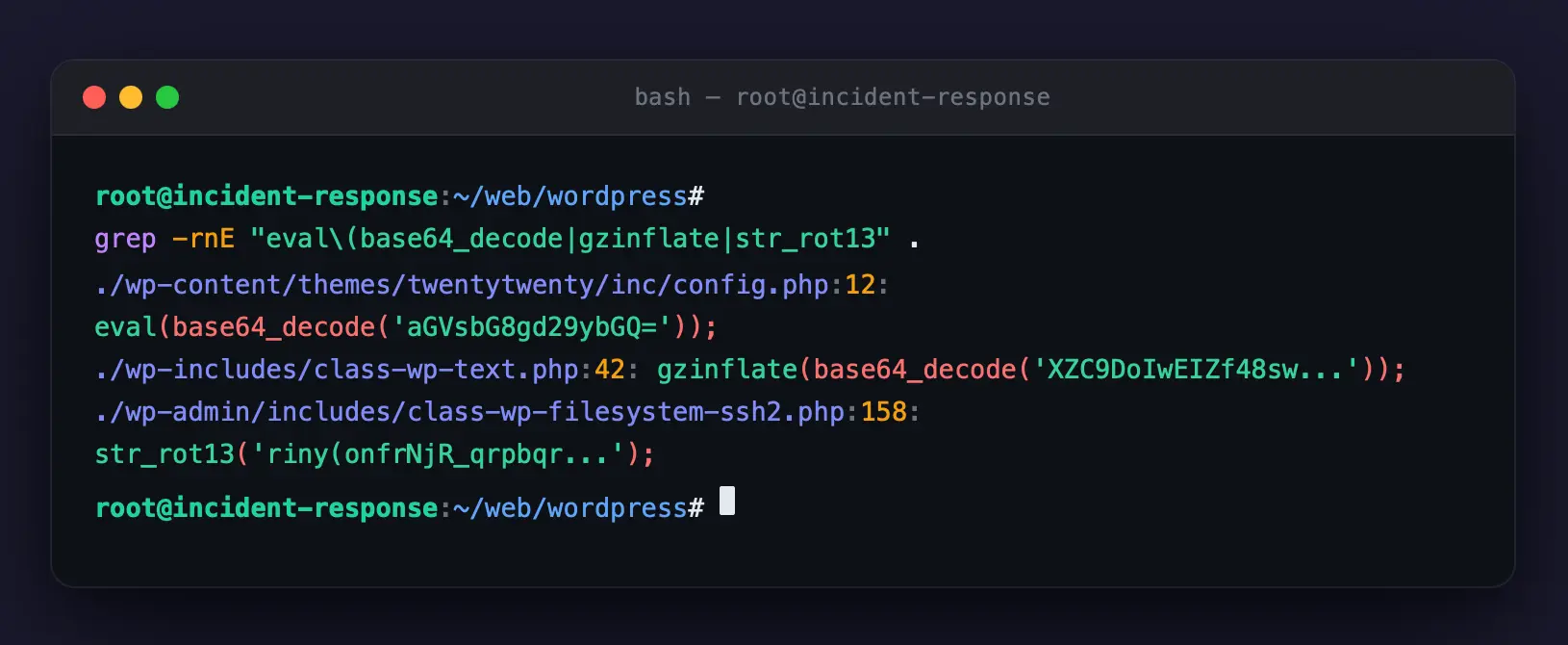
grep -rnE across a compromised WordPress install
reveals obfuscated payloads in theme files, wp-includes and wp-admin.
4. Contain before full cleanup
Do not delete random files immediately. First isolate and stabilize.
- Take a full file + database backup snapshot for forensic comparison.
- Put admin access behind temporary restrictions (IP allowlist or maintenance gate).
- Rotate all credentials: hosting panel, SSH/SFTP, DB user, WordPress admins.
-
Force logout all sessions and regenerate salts in
wp-config.php.
5. Clean and restore from trusted baseline
The safest method is replacing core, theme, and plugins from known-clean sources rather than trying to patch infected files one by one.
- Reinstall WordPress core from official release.
- Replace themes/plugins with fresh vendor copies.
- Migrate only verified media assets from uploads.
- Review and purge unknown admin users, API keys, and webhook endpoints.
- Remove unknown autoloaded options and suspicious cron entries.
6. Validate remediation quality
After cleanup, run the same checks used at the beginning to confirm closure.
- Bot vs browser comparison on previously infected URLs now returns equivalent content.
- No hidden Japanese pages are discoverable via internal crawl.
- Search Console coverage starts dropping malicious URLs after removals.
- Log anomalies (suspicious user agents, repeated POST probes) decrease.
7. Harden against reinfection
Most reinfections happen because the original entry point was never identified. Add controls that reduce blast radius and detect tampering early.
- Disable PHP execution in uploads where possible.
- Use least-privilege filesystem and DB permissions.
- Remove abandoned plugins/themes and keep components patched.
- Enable 2FA for all admin users.
- Monitor content integrity and bot-visible rendering continuously.
Quick response checklist
- Collect evidence and suspicious URLs.
- Confirm bot-only behavior (possible cloaking).
- Snapshot files/database before changes.
- Rotate credentials and terminate sessions.
- Restore from trusted clean sources.
- Re-check indexing, logs, and rendered output.
- Submit removals and recrawl requests in Search Console.