SEO Integrity • Cloaking Detection
Google Sees One Site, Users See Another: How SEO Cloaking Actually Happens (Without You Knowing)
There is a category of SEO problem that is almost impossible to detect by looking at your own website. Your pages load correctly. Your rankings look stable. Your analytics report nothing unusual. But in the background, Google is crawling a completely different version of your site — one that may be full of spam links, keyword-stuffed content, or redirects to pages you have never seen.
This is cloaking — and in 2026 it is far more common, far more technically sophisticated, and far harder to detect than most site owners and agencies realize. This guide breaks down exactly how it works, why it happens even on sites that have never been deliberately compromised, and what you can do to verify what Google is actually seeing on your site.
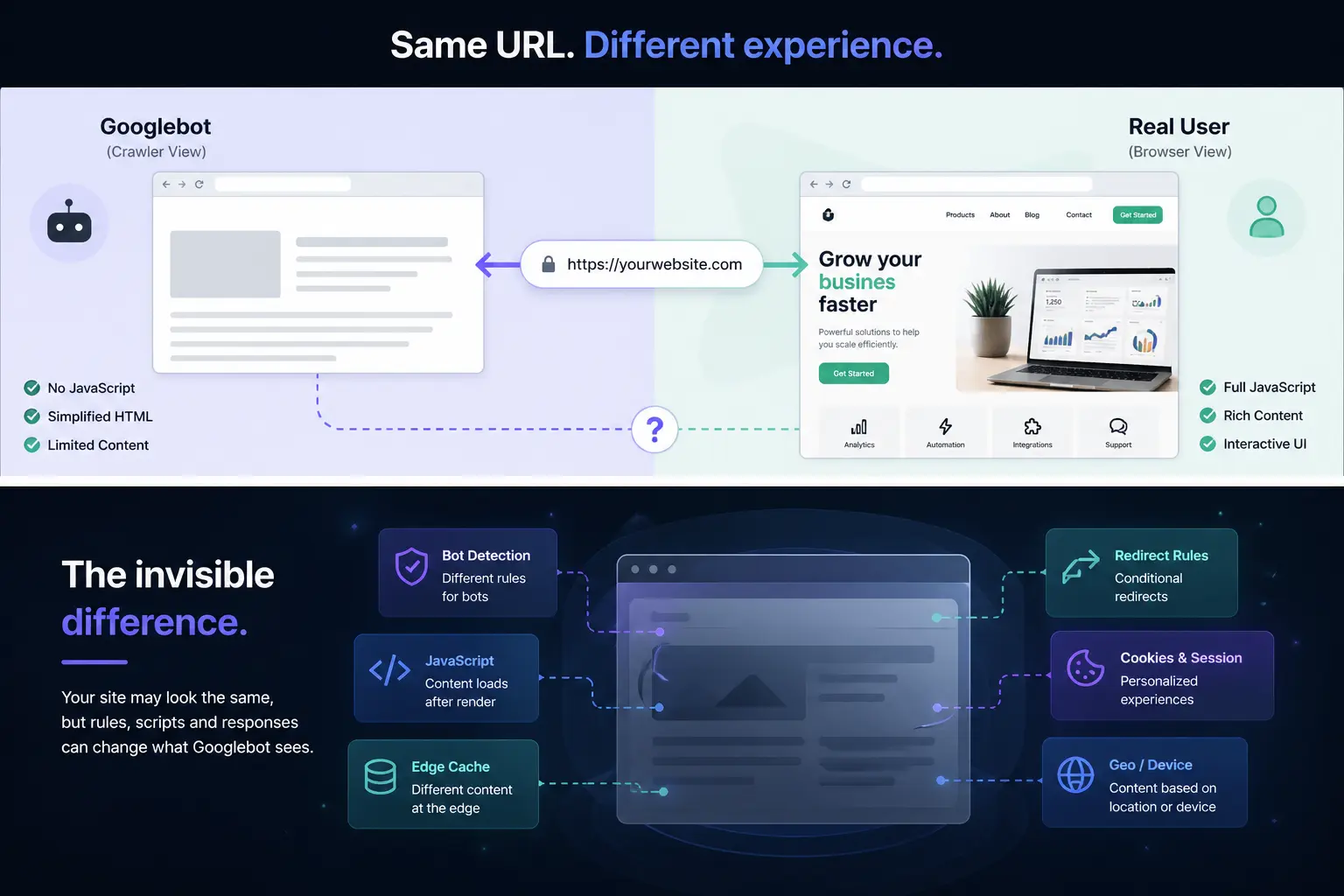
1. What cloaking actually means in 2026
The original definition of cloaking — serving one page to search engine crawlers and a different page to human visitors — dates back to the early 2000s. It was a blunt instrument: if the request came from Googlebot's known IP address, return the optimized version; otherwise, return the real page. Google detected it, penalized it heavily, and most practitioners abandoned it.
What exists today is more nuanced. Modern cloaking does not require a deliberate decision to deceive. The same technical outcome — Google seeing something different from what users see — can be produced by a misconfigured CDN, a poorly written WordPress plugin, an aggressive bot-detection firewall, or a malware injection that specifically targets crawler user agents.
Google's spam policies define cloaking as showing "different content or URLs to human users and search engines." That definition is intentionally broad — it does not require malicious intent. The outcome is what matters, not the cause.
2. Accidental cloaking: plugins, caches, CDNs, and geolocation
The most counterintuitive fact about cloaking in 2026 is that a significant portion of it is unintentional. Site owners running legitimate businesses with no interest in manipulating search results can still end up serving different content to Googlebot — often because of tools they actively paid for and trust.
Caching layers
WordPress caching plugins like WP Rocket, W3 Total Cache, and LiteSpeed Cache are designed to serve static HTML to crawlers and dynamic content to logged-in users. Most configurations handle this correctly. But edge cases exist: if the cached version is built before a critical change, if the cache is stale due to a server error, or if the plugin applies different caching rules for bot user agents, Googlebot can receive an outdated or structurally different page.
A site rebuilt after a redesign with aggressive cache TTLs can serve Googlebot the old HTML for weeks after the new design is live for users. From Google's perspective, the site's structure, internal links, and content have not changed — because they haven't, for the crawler.
CDN edge behavior
Content delivery networks introduce another layer where divergence can occur. Cloudflare, Fastly, and similar providers allow custom rules that modify or redirect responses based on user agent, IP reputation, or geographic origin. A rule intended to block scrapers can also match Googlebot. A challenge page served to suspicious traffic can intercept the crawler before it ever reaches the origin server.
Cloudflare's "Under Attack" mode, for example, serves a JavaScript challenge page to all visitors — including crawlers. During the time that mode is active, Googlebot may not be able to access the page content at all, effectively receiving a blank or near-empty response instead of the actual site content.
Geolocation and IP-based targeting
Some sites serve different content based on the visitor's country. Googlebot crawls primarily from US-based IP addresses. If a site serves an English-language version to US visitors and a different language or a different product catalog to European visitors, Googlebot consistently indexes only the US version — regardless of where the site's actual audience is.
This is not always a ranking manipulation problem, but it becomes one when the geolocation logic is inconsistent, when it affects canonical pages, or when marketing campaigns serve different landing page content based on ad platform traffic — content that Googlebot never sees.
Security plugins and bot filters
Security plugins that block or challenge known bot user agents can inadvertently include Googlebot in their blocklists. Wordfence, iThemes Security, and similar tools have configurable bot protection features. A rule added during an incident response — for example, blocking all non-browser user agents after a scraping attack — can persist long after the incident is resolved, quietly preventing Google from crawling the site.
3. Googlebot is not a real browser
Understanding why cloaking is so difficult to detect requires understanding what Googlebot actually is — and what it is not.
Googlebot is an HTTP client. It sends a request with a specific user
agent string (e.g.,
Mozilla/5.0 (compatible; Googlebot/2.1;
            +http://www.google.com/bot.html)
) from a set of known IP ranges published by Google. It does not execute
JavaScript by default in the same way a browser does. It does not maintain
persistent sessions. It does not accept cookies in the way a logged-in user
would. It does not render pages with the same timing as a modern browser.
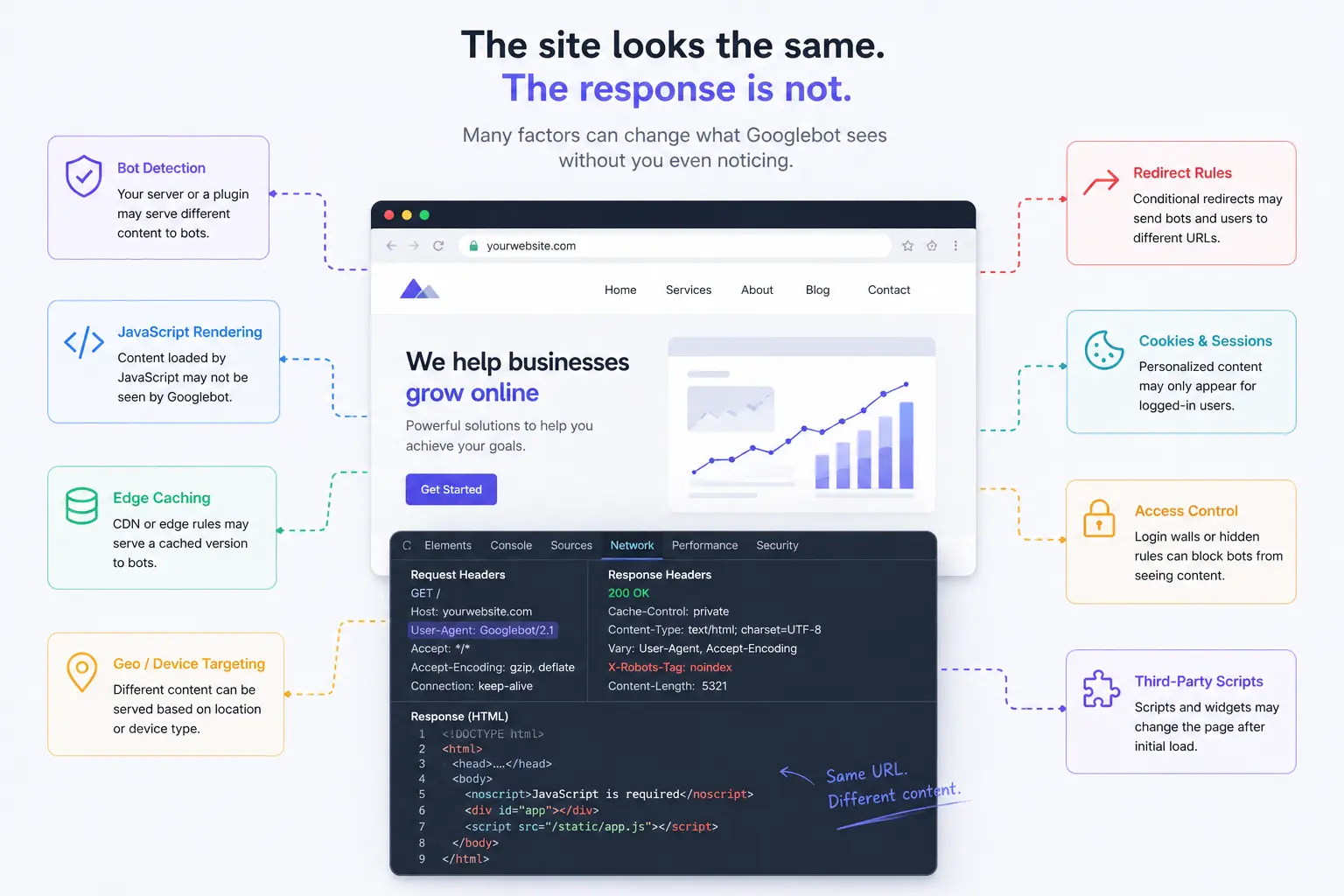
This means any server-side logic that branches on user agent, IP address, accept headers, cookie state, or JavaScript execution capability can produce a different response for Googlebot than for a human visitor — without anyone explicitly writing code to cloak the site.
Google does run a second-wave JavaScript rendering pipeline (called Googlebot's rendering service), but rendering happens asynchronously and is not guaranteed for every URL on every crawl. Pages that depend on client-side JavaScript to inject content, links, or structured data may be indexed in their pre-render state — which can be structurally very different from what a browser displays.
4. Why you almost never notice it
The reason cloaking is so difficult to catch is simple: you are never Googlebot. When you visit your site to check if it looks correct, you arrive with a real browser, a real IP address, and — if you have visited before — cookies that identify you as a returning user. Every single one of those attributes can trigger a different code path on the server compared to what the crawler hits.
In the case of malware-based cloaking, attackers specifically engineer this asymmetry. The injected code checks the user agent before doing anything: if it matches Googlebot or another known crawler, it serves the spam content. If it matches a regular browser, it passes through cleanly. The owner visits the site, sees nothing wrong, and moves on. Google sees something entirely different.
Even Google Search Console provides limited visibility here. The URL Inspection tool shows you the last crawled version of a page, but it does not update in real time. A site that was clean when it was last crawled can be serving spam content today. The console will show nothing unusual until the next crawl cycle.
The practical implication is that passive monitoring — watching your traffic, checking your Console data, opening your pages in a browser — is structurally insufficient for detecting cloaking. It can only tell you what a logged-in, cookie-bearing browser user sees. It tells you nothing about what the crawler sees.
5. How to verify what Google actually sees
There are two approaches: manual inspection and automated scanning. Both have their place. Neither alone is complete.
Manual: Google Search Console URL Inspection
The URL Inspection tool in Search Console shows you the rendered HTML from Google's last crawl. This is your first stop. Look at the rendered HTML tab — not just the screenshot — and check for content, links, or scripts that should not be there. The limitation is that it reflects the last crawl, not a live fetch, and refreshing via "Test Live URL" only updates for that specific request, not for ongoing monitoring.
Manual: curl with Googlebot user agent
You can simulate a Googlebot request from your terminal:
curl -A "Mozilla/5.0 (compatible; Googlebot/2.1; +http://www.google.com/bot.html)" \
  -L https://yoursite.com/page-to-check
Compare the returned HTML to what your browser receives. If they differ structurally — different links, different text, different redirects — you have a cloaking signal worth investigating. Note that this test does not replicate Google's actual crawler IPs, so a cloaking implementation that filters by IP rather than user agent will not be caught this way.
Manual: site: operator in Google Search
Run
site:yourdomain.com
in Google Search and review the indexed pages. Look for URLs you do not
recognize, titles in unexpected languages, or descriptions that do not match
your content. Unexpected pages in the index are a strong signal that something
is being served to the crawler that is not being served to users.
Automated: diff-based scanning
The most reliable approach is to fetch the same URL twice in parallel — once with a crawler user agent from a neutral IP, once with a browser user agent — and compare the responses programmatically. This produces a structural diff: different links, added or removed DOM nodes, modified scripts, changed redirect chains.
Manual comparison is feasible for a single URL. For an agency managing dozens or hundreds of client sites, it is not. Automated scanning at a regular cadence — daily or weekly — is the only way to catch cloaking before it has had weeks to damage rankings.
6. The SEO consequences of undetected cloaking
Google's response to detected cloaking is unambiguous: manual action. A manual penalty for cloaking removes the affected pages from the index. For severe violations, the entire domain can be deindexed. The recovery process — filing a reconsideration request after cleaning the site — can take weeks to months and is not guaranteed.
But the more common outcome of undetected cloaking is not a manual action — it is gradual ranking erosion. When Google indexes spam-injected content on a legitimate domain, it does not necessarily issue a penalty immediately. Instead, trust signals erode over time. Pages that previously ranked well begin to drop. The domain's overall authority degrades. By the time the owner notices the traffic decline, the damage has been accumulating for months.
For a business that depends on organic traffic, this is existential. For a freelancer managing client sites, it is a reputational risk that no amount of after-the-fact cleanup can fully repair with the client.
The asymmetry of detection
- → Attackers can test their cloaking implementation against real Googlebot IPs before deploying it on your site.
- → You can only verify what Google sees using simulated requests — which may or may not match the real crawler behavior.
- → Google Search Console shows you the last crawl, not the current state. A site can be compromised hours after a clean crawl.
- → Manual penalties take time to issue — but ranking damage begins long before any penalty is applied.
7. The key signals to look for
Not every cloaking implementation looks the same. But the following patterns are reliable early indicators that something is being served to the crawler that you are not seeing in your browser.
- 1 Unexpected pages in the Google index — pages that exist in Google's index but do not appear in your CMS
or sitemap. Use
site:yourdomain.comregularly and investigate unfamiliar URLs. - 2 Foreign-language snippets in search results — your site appearing in Japanese, Chinese, Russian, or Arabic in search results for queries you never targeted. This is a hallmark of keyword injection cloaking.
- 3 Unexplained ranking drops on stable pages — pages that have ranked consistently for months suddenly losing position without any change to the page content or the site structure.
- 4 Structural HTML diff between crawler and browser — more links in the crawler response than in the browser response, additional hidden text, or scripts that load only when the user agent matches a crawler pattern.
- 5 Different HTTP response codes for crawler vs browser — a page that returns 200 to a browser but 301 or 404 to a crawler user agent, or vice versa.