Cloaking Detection • Mobile SEO
Sneaky Mobile Redirects: How .htaccess Cloaking Hijacks Only Your Mobile Visitors
You open the site on your laptop. It looks fine. Your developer checks it. Fine. Search Console shows no manual actions. Then a customer messages you a screenshot: a full-screen "You've won a free iPhone" page, or a fake antivirus warning, opened straight from a Google search result on their phone. Nobody on the team can reproduce it, because nobody on the team is testing the site the way an attacker wants it tested — from a real smartphone, on cellular data, arriving from a search click.
This is a sneaky mobile redirect: a cloaking technique that only activates for real mobile visitors, leaving every other way of checking the site — desktop browsers, Googlebot, most automated scanners — looking completely normal. It is one of the security issue categories Google names explicitly in Search Console, yet it is rarely covered with the same depth as pharma injections or Japanese keyword hacks. This guide explains exactly how the mechanism works, why standard audits miss it, and the workflow to confirm, trace, and remove it.
1. What makes this different from other cloaking attacks
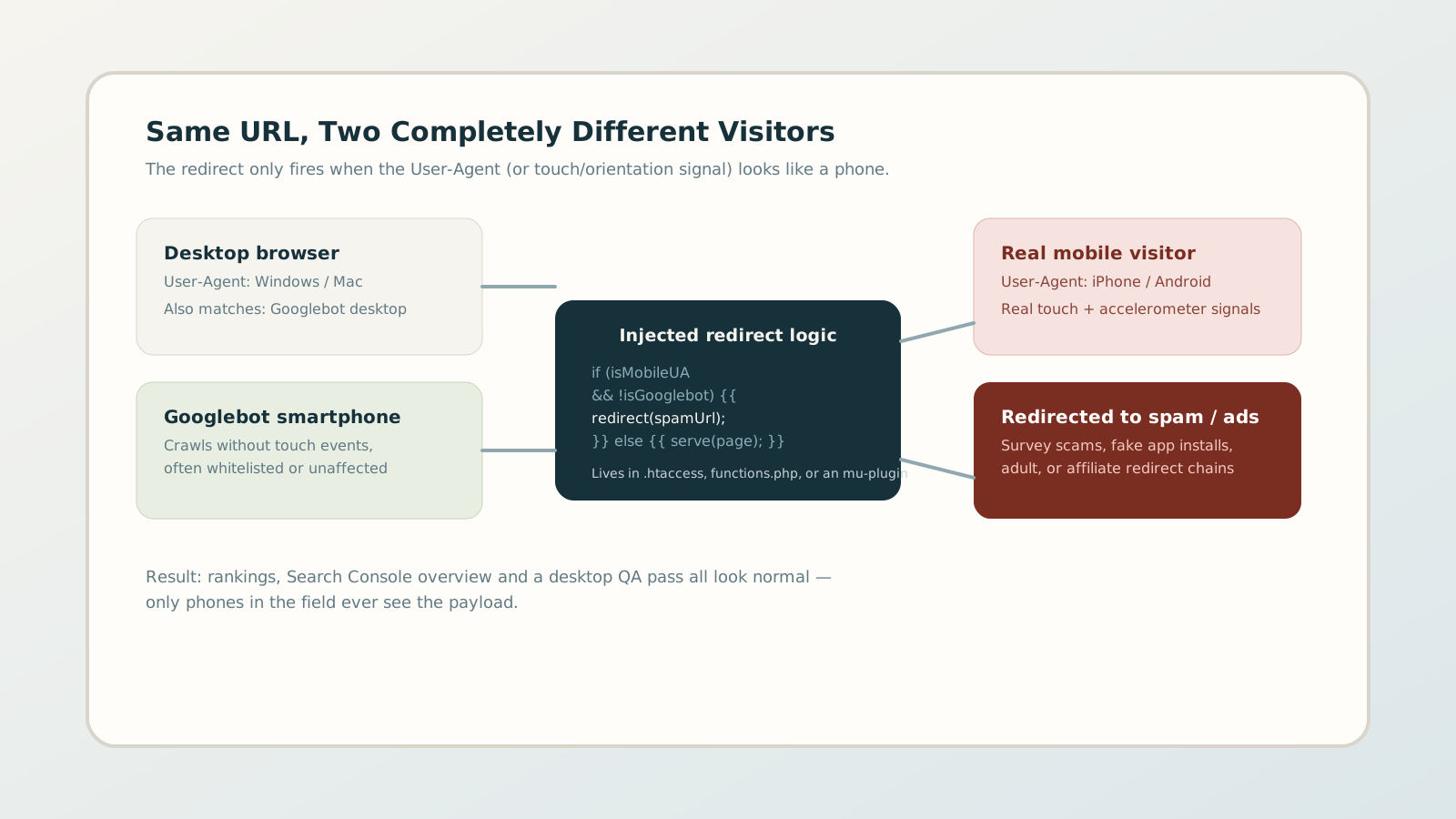
Most cloaking guides describe a split between what Googlebot sees and what a browser sees. Sneaky mobile redirects add a second axis: the split is between device types, layered on top of the crawler-versus-browser distinction. The injected code typically checks several signals at once before deciding whether to redirect:
- User-Agent string: does it match iPhone, Android, or a mobile browser token, while excluding known crawler strings like Googlebot, Bingbot, or AdsBot?
- Referrer header: did the visitor arrive from a Google or Bing search results page, rather than typing the URL directly?
- Cookie or session state: has this visitor (by IP or cookie) already been redirected once today, to avoid looping the same person repeatedly and drawing attention?
- Geography: is the visitor's IP in a country where the monetized offer (survey scam, fake app install, adult, gambling) actually pays?
A redirect that only fires for mobile devices, arriving from a search click, from specific countries, once per session, is deliberately built to survive casual inspection. Every condition that must be true before the payload appears is one more reason a quick desktop check reports "everything looks fine."
2. Where the redirect logic actually lives
On WordPress and most PHP stacks, attackers rarely rewrite the whole site. They inject a small conditional block into a file that already runs on every request, so it is easy to miss inside a much larger codebase:
- 1 .htaccess rewrite rules: Apache
can match
HTTP_USER_AGENTandHTTP_REFERERdirectly in rewrite conditions, redirecting before PHP even loads. No plugin scan will catch this because it never touches application code. - 2 Theme functions.php: a hook
on
template_redirectorwp_loadedchecks the request headers and callswp_redirect()before any page markup renders. - 3 Must-use plugins: files dropped
into
wp-content/mu-plugins/load automatically, are not listed on the regular Plugins screen, and survive a plugin-only cleanup. - 4 Database-stored payloads: the redirect target and rules are sometimes stored inside a widget
option or theme mod in
wp_options, fetched by a tiny loader snippet, so a file-only integrity check never finds the actual malicious content.
Any of these entry points can arrive through a vulnerable plugin, a nulled/pirated theme with a backdoor pre-installed, stolen FTP or hosting-panel credentials, or a compromised ad network SDK bundled into a mobile-targeted script.
3. Why standard audits and Search Console miss it
Three habits combine to keep this attack invisible for weeks or months:
- QA happens on desktop. Developers and site owners overwhelmingly check their own work on a laptop. A redirect gated on a mobile User-Agent simply never fires during normal development or review.
- Googlebot doesn't always match the trigger. Even when Googlebot's smartphone crawler is technically "mobile," it lacks a search-referrer header, touch events, or session history — any of which the injected code can require before redirecting. Google can crawl the clean page thousands of times and never see the payload.
- Search Console reacts, it doesn't predict. The Security Issues report is typically populated after Google's systems or a user report flags the behavior at scale — not the moment the code is injected. A site can carry the infection for a long time with a blank Security Issues report.
The gap between "when the code was injected" and "when it becomes visible in Google's tooling" is exactly where mobile rankings and user trust quietly erode.
4. The signals that should make you suspicious
Without a dedicated scanning tool, a handful of indirect signals often show up before a customer sends you a screenshot:
- A mobile bounce rate or session duration that drops sharply for organic search traffic only, while direct and desktop traffic stay stable.
- Mobile impressions holding steady in Search Console while mobile clicks or average position quietly worsen.
- Support tickets or reviews mentioning pop-ups, "your device is infected" warnings, or app-store redirects — especially if they mention arriving from a Google search.
- Recently modified timestamps on .htaccess, functions.php, or files inside mu-plugins that nobody on the team touched.
None of these confirm the issue alone, but two or more together are enough reason to run a direct mobile test rather than wait for Search Console to catch up.
5. A practical detection workflow
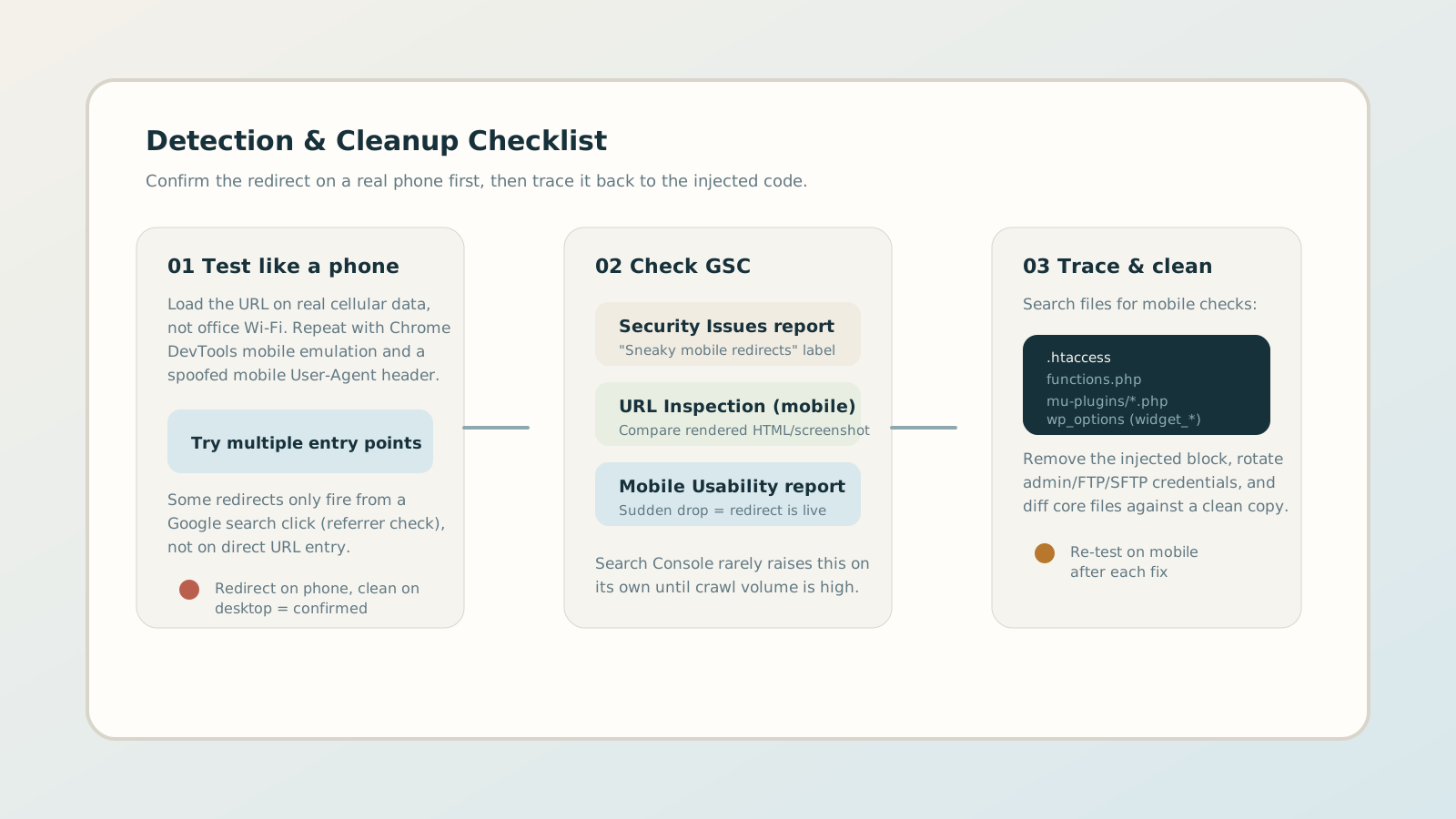
Confirm the behavior first, then trace it to the code. Skipping straight to a file audit without reproducing the redirect wastes time on the wrong files.
Step A — Reproduce it like a real visitor
Open the URL on a physical phone using cellular data, not office Wi-Fi (some scripts also allowlist known corporate or hosting IP ranges). Tap through from an actual Google search result rather than pasting the URL directly, since the redirect may depend on the referrer.
Step B — Cross-check with spoofed requests
Use Chrome DevTools' device toolbar with a mobile User-Agent, and separately send a raw request with curl using a mobile UA string and a Google referrer header. Compare the response against a desktop request with no referrer:
curl -A "Mozilla/5.0 (iPhone; CPU iPhone OS 17_0 like Mac OS X)
          AppleWebKit/605.1.15"

  -e "https://www.google.com/" -sI https://example.com/page
A 301
or 302
appearing only in this request, and not in an equivalent desktop request,
confirms conditional redirect logic on the server.
Step C — Check Search Console's mobile-specific reports
Review the Security Issues report for a "Sneaky mobile redirects" label, run URL Inspection with the smartphone crawler and compare the rendered screenshot, and watch the Mobile Usability trend for a sudden, unexplained drop.
Step D — Locate and remove the injected code
Search .htaccess and functions.php for
HTTP_USER_AGENT,
HTTP_REFERER, and wp_redirect
patterns that do not belong to code your team wrote. List every file in
mu-plugins/
— none of it appears in the standard Plugins screen, so anything there deserves
a manual look. Diff core WordPress and theme files against a known-clean
copy of the same version to catch modified core files.
6. Cleanup, credential rotation, and requesting review
Removing the visible redirect is not the end of the incident. Attackers who planted a mobile redirect usually left themselves more than one way back in.
- 01 Remove every instance of the injected block — not just the first one found. Copies are often duplicated across .htaccess, a mu-plugin, and a stored database option as redundancy.
- 02 Rotate every credential that could have created the access: hosting panel, SFTP/FTP, WordPress admin accounts, and any API keys stored in the environment.
- 03 Patch the entry point, whether that is an outdated plugin, a nulled theme, or a compromised third-party script, so the same door does not reopen on the next update cycle.
- 04 Request a review in Search Console under Security Issues if Google applied a manual action, and only submit once you have re-tested on a real phone and confirmed the redirect no longer fires.
Rankings and mobile Search Console metrics typically take longer to recover than the technical fix itself, so document the timeline — discovery date, fix date, review submission date — for stakeholders asking why traffic has not instantly returned.
7. Preventing the next mobile-only redirect
Because the attack is specifically designed to dodge desktop checks, prevention has to include device-aware monitoring, not just general malware scanning:
- Schedule recurring checks that request pages with a mobile User-Agent and a search-engine referrer, not only a plain desktop request.
- Add file-integrity monitoring on .htaccess, functions.php, and the mu-plugins directory so an unexpected change triggers an alert instead of silence.
- Keep plugins, themes, and core updated, and remove any nulled or pirated theme entirely rather than patching around it.
- Review Search Console's Mobile Usability and Security Issues reports on a fixed schedule instead of only after a complaint arrives.
A monitoring routine built around "what does a phone see" closes the exact blind spot this attack is designed to exploit.