Cloaking Detection • CDN Security
CDN and Edge Cloaking: When Cloudflare Rules Show Google One Thing and Users Another
Most cloaking write-ups start inside WordPress: a bad plugin, an
injected .htaccess rule, a
compromised theme file. That model is incomplete. A growing share of
silent SEO damage now lives one layer above the CMS — in Cloudflare
Workers, CDN transform rules, bot management policies, and geo-based
redirects that never touch the origin.
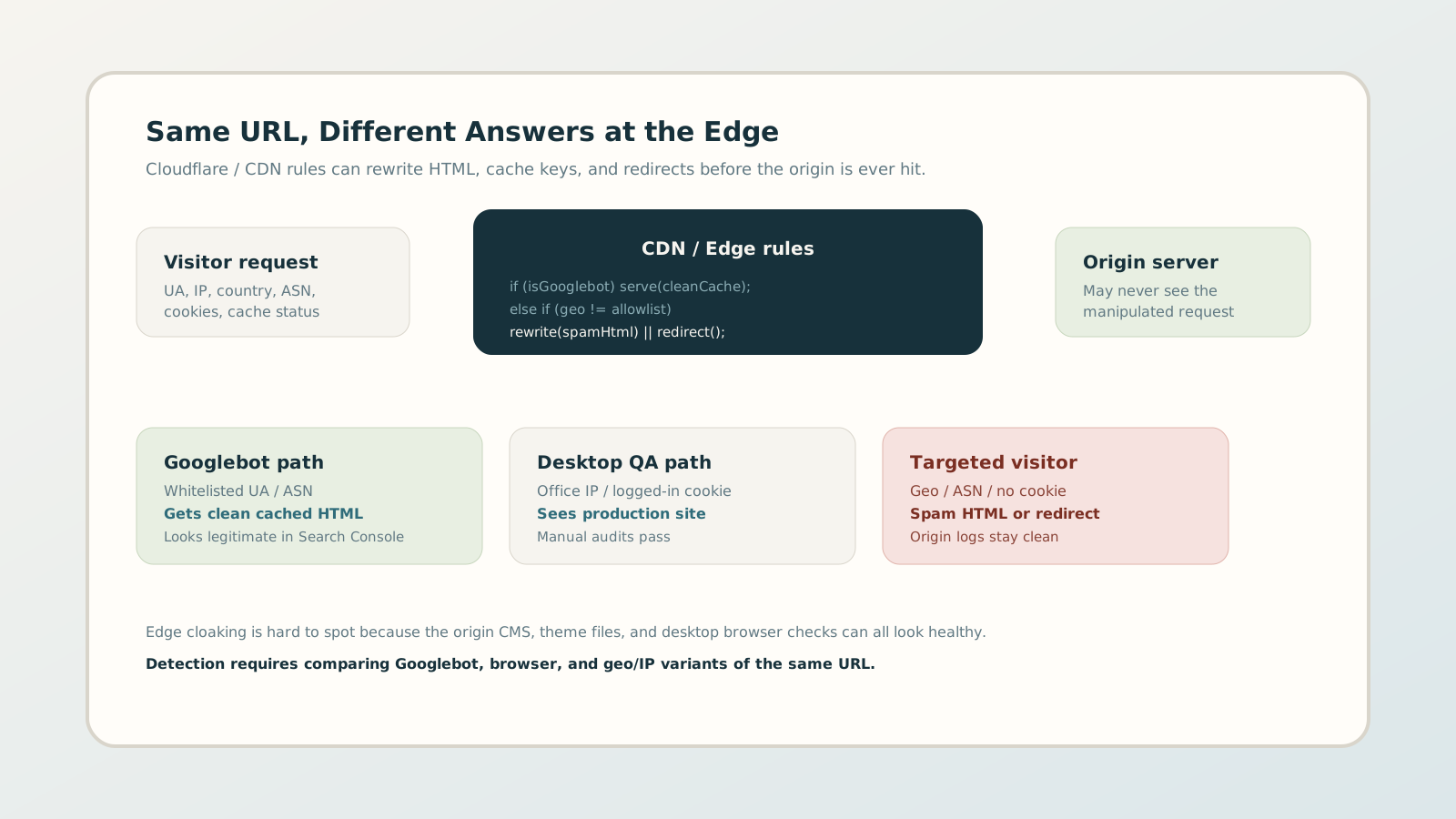
That is CDN / edge cloaking: the same URL returns different HTML or a different redirect chain depending on who asks, and the decision happens at the edge. Your desktop browser looks fine. Googlebot may look fine. The compromised visitor path still converts spam. This guide explains how edge cloaking works, why origin-only audits miss it, and how freelancers and agencies can investigate Cloudflare-class setups without guessing.
1. Why edge cloaking is different from origin cloaking
Origin cloaking changes what the application server returns. Edge cloaking changes what the visitor receives before that server is involved. In practice that means:
- File integrity tools and plugin scanners can report a clean WordPress install.
- Origin access logs may never show the spam response, because the edge served it from cache or a Worker.
- A teammate checking the site from the office IP, while logged in, can keep seeing the real marketing site.
This is why agencies lose days in the wrong place. They rebuild the CMS, rotate WordPress passwords, and still have a poisoned edge rule sitting in Cloudflare.
2. Four edge patterns that create cloaking risk
Not every CDN rule is malicious. Legitimate personalization, bot mitigation, and geo compliance exist. The risk appears when visitor signals start changing indexed content or redirect chains in ways search engines treat as deceptive.
A. Googlebot whitelists that hide spam paths
A rule allows verified Googlebot (or a broad “search engine” ASN) to always receive the clean cached page, while other traffic hits a rewrite or redirect. Manual QA that spoofs Googlebot can look clean and still miss what real users see.
B. Geo or ASN rewrites without a business reason
Some campaigns need country-specific pages. Attackers abuse the same mechanism to serve casino, loan, or pharma HTML only to selected regions while leaving the homepage untouched for the client’s home market.
C. Cache keys that fragment reality
If cache varies on User-Agent, country, or cookies, two people can hit the same URL and pull completely different HTML objects. That is useful for A/B tests — and dangerous when a poisoned variant stays cached for crawlers or visitors you do not control.
D. Orphan Workers and transform rules
Compromised Cloudflare accounts often leave a Worker or Transform Rule with no owner on the client team. It rewrites body content or Location headers for a subset of requests. The dashboard looks busy; nobody remembers who created the rule.
3. Misconfiguration vs attack: how to tell the difference
Edge cloaking investigations fail when every anomaly is treated as malware. Use a simple triage:
- 1 Documented business rule: owned by marketing/legal, named, and expected (cookie consent geo, store locator, bot challenge on login).
- 2 Suspicious but explainable: aggressive Bot Fight Mode, stale staging Worker, accidental country redirect left after a campaign.
- 3 Incident: unknown Worker, spam keywords in edge-served HTML, Googlebot-only clean path with user-facing redirects, or account users/tokens nobody recognizes.
Categories 2 and 3 both need evidence. Category 3 needs containment before cleanup storytelling.
4. A practical edge audit workflow
Treat the CDN as its own attack surface, separate from the CMS cleanup playbook.
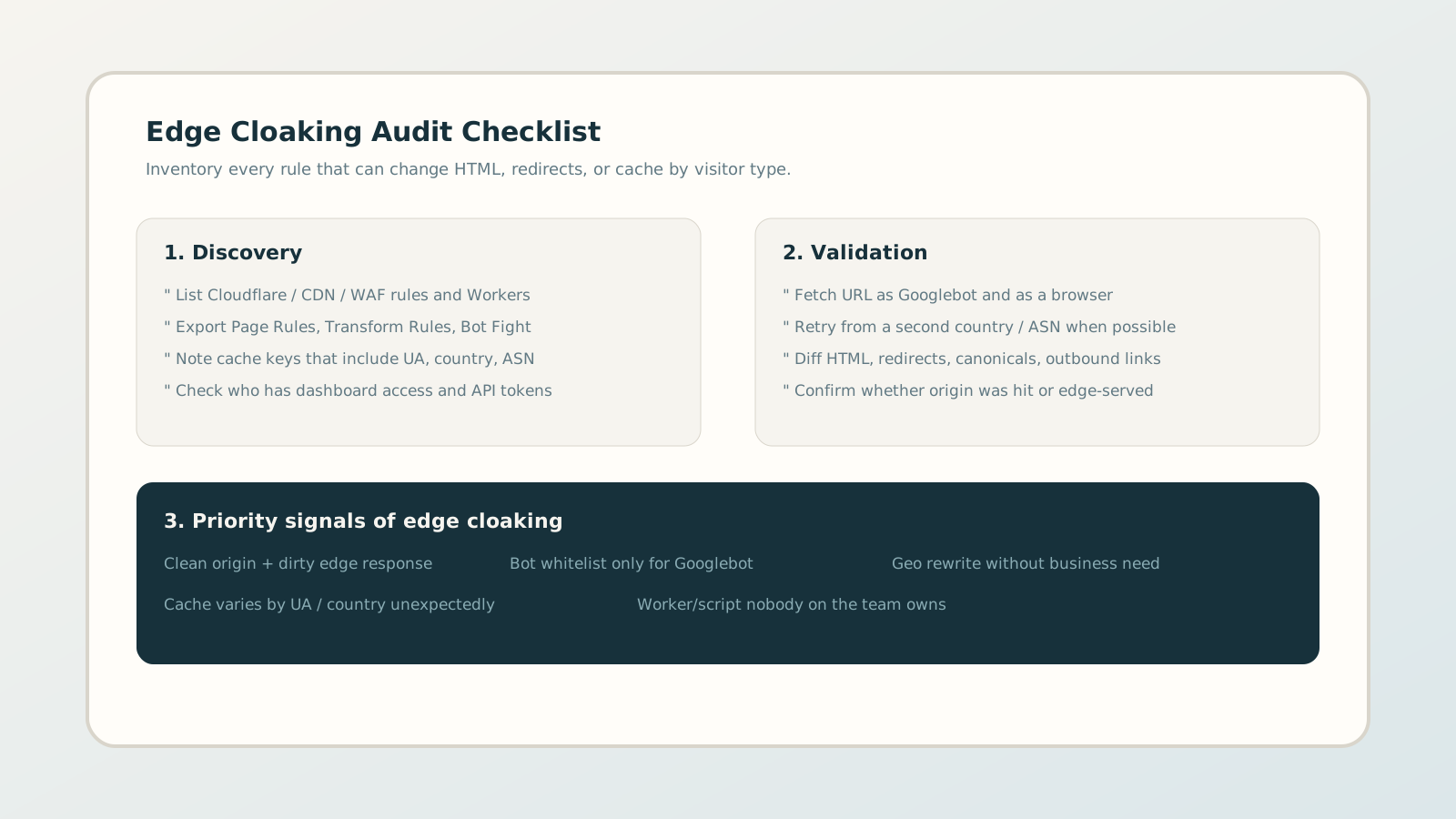
Step A — Inventory the edge
Export or screenshot: Page Rules, Transform Rules, Workers Routes, Bot / WAF policies, cache settings, and account members. Note any rule that references User-Agent, country, ASN, or “known bots.”
Step B — Dual-fetch the same URL
Request the URL as Googlebot and as a normal browser. Diff status codes, redirect chains, canonical tags, titles, and outbound links. If the HTML only diverges at the edge, you have a cloaking signal even when WordPress is clean.
Step C — Add a second vantage point
When possible, fetch again from another country or network. Geo-only spam is easy to miss if every check runs from the same office IP.
Step D — Prove edge vs origin
Use response headers (cache status, CF-Ray, age, via) and origin logs to confirm whether the suspicious body was generated by the app or injected earlier. That single fact decides whether you patch PHP or revoke a Cloudflare token.
5. Containment without breaking production
Do not start by deleting every Cloudflare rule. Sequence the response:
- 01 Capture evidence: HTML samples, headers, rule IDs, screenshots, and timestamps.
- 02 Lock the account: rotate Cloudflare passwords and API tokens, review members, enable MFA.
- 03 Disable the unknown: turn off orphan Workers / transforms that rewrite body or Location headers.
- 04 Purge and re-verify: purge cache for affected URLs, then re-run Googlebot vs browser diffs before telling the client the incident is closed.
6. Prevention for agencies and freelancers
Edge cloaking is as much an operations problem as a malware problem. Strong teams enforce a few defaults:
- Every Worker and transform rule has a named owner and a purpose note.
- Cache variation on User-Agent or country requires explicit approval.
- Client onboarding includes Cloudflare (or CDN) access review, not only WordPress admin.
- Monitoring compares crawler and browser responses on a schedule, not only after rankings drop.
7. Why point-in-time checks still fail at the edge
A one-off dual fetch proves what the URL returned today. It does not prove what an attacker will deploy tomorrow after stealing a CDN token. Edge rules are fast to change and easy to hide among legitimate bot mitigation.
Continuous monitoring closes that gap: same URLs, repeated crawler vs browser comparisons, alerts when the mismatch appears. For agencies, that is the difference between finding edge cloaking early and explaining a manual action after the fact.