Cloaking Detection • Technical SEO
User-Agent Cloaking vs IP Cloaking: Why Faking Googlebot Is Not a Real Test
The most common cloaking “test” on the internet is a one-liner: fetch the URL with a Googlebot User-Agent and compare it to a normal browser. If the two HTML bodies match, people declare the site clean. If they differ, they declare cloaking. That workflow is not wrong — it is incomplete.
User-Agent cloaking and IP cloaking are different gates on the same request. Spoofing the crawler string only tests the first gate. The second gate still sees your laptop, your office NAT, or a Vercel datacenter. This guide separates the two techniques, explains why attackers stack them, and shows a dual-signal audit that does not confuse a 403 with a clean bill of health.
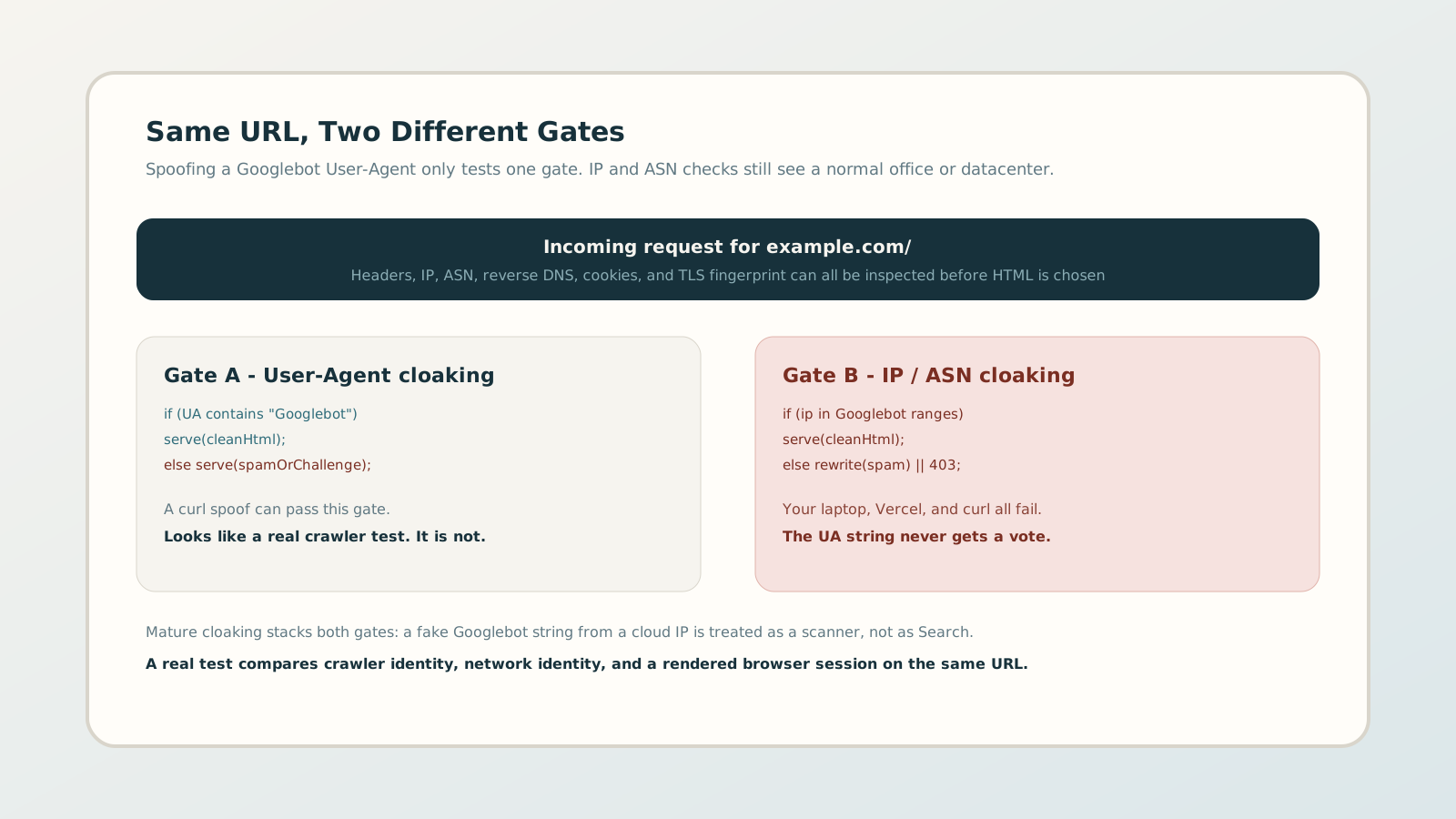
1. Two identities, one request
Every HTTP request carries more than a URL. For cloaking, two identities matter:
- Claimed identity — the User-Agent, and sometimes extra headers that say “I am a crawler.” Easy to forge. Cheap to test.
- Network identity — source IP, ASN, reverse DNS, and (at the edge) TLS fingerprint. Hard to forge as Googlebot from a laptop.
Amateur cloaking trusts the claim. Mature cloaking verifies the network. Google itself documents that you should confirm Googlebot with reverse DNS and IP ranges, not by trusting the string. Attackers read the same documentation and invert it: serve the clean page only when both identities line up.
2. User-Agent cloaking: the gate everyone already knows
User-Agent cloaking keys off the header string. Typical patterns:
- If the UA contains
Googlebot,bingbot, or a generic “bot” token, serve a clean, keyword-stuffed, or indexable page. - If the UA looks like Chrome on a phone or desktop, serve the marketing site, an interstitial, or a redirect to spam.
- If the UA looks like curl, wget, or a security scanner, return a challenge or a thin placeholder.
This is the version plugins, old PHP snippets, and cheap black-hat
kits still ship. It is also the version a curl -A "Googlebot" check can catch. That is why it feels like a complete test. For
2014-era cloaking, it often was.
For a broader picture of how cloaking looks to Search versus users, see Google sees one site, users see another. The rest of this article is narrower: which identity the server actually trusted.
3. IP and ASN cloaking: the gate spoofing never reaches
IP cloaking ignores the story in the headers and looks at who opened the TCP connection. Implementations range from crude to careful:
A. Hard IP / CIDR allowlists
Serve the “search” HTML only if the source address sits in published Googlebot ranges (or a stale copy of them). Everyone else gets the user page, a 403, or rewritten spam. Your spoofed UA never gets a vote.
B. ASN and reverse-DNS checks
Slightly more robust kits resolve the IP, confirm a Google hostname, then forward-confirm the address. A Vercel, AWS, or home ISP reverse DNS record fails immediately. The response can look like “bot management” even when the intent is to hide spam from anyone who is not Search.
C. Datacenter and scanner denylists
Instead of allowlisting Google, some stacks denylist known cloud ASNs, security vendors, and headless-browser farms. A check from a SaaS scanner then returns a challenge or an empty body, while a real user on residential broadband still sees the spam path.
This is why “I spoofed Googlebot and got a 403” is not a clean result. A 403, a CAPTCHA, or a zero-word body means you hit a gate. It does not tell you which HTML Googlebot would have received from a verified Google IP.
4. Why attackers stack both gates
Stacked cloaking is the current default for anyone who has been burned by journalists, agencies, or automated scanners:
- 01 UA gate first: cheap filter for obvious browsers versus obvious bots.
- 02 IP gate second: fake Googlebot strings from cloud IPs are treated as researchers, not as Search.
- 03 JS / DOM third: after the HTML is chosen, a script can still swap links, inject keywords, or redirect mobile users.
The stack can live in PHP, in
.htaccess, or at the CDN. Where
the rule runs is a different article —
CDN and edge cloaking
covers Cloudflare Workers and cache keys. The point here is
which signal the rule reads, not which product hosts it.
5. Accidental versions: WAF, bot fight, and “block fake bots”
Not every UA/IP split is malware. Legitimate bot management does exactly the same first-pass: challenge datacenter IPs that claim to be Googlebot. The difference is intent and payload.
- 1 Documented WAF: named owner, same challenge for scanners, clean HTML for both real users and verified crawlers, no spam keywords in either body.
- 2 Misconfiguration: Bot Fight Mode or a “block fake Googlebot” rule so aggressive that monitoring tools always get 403, while Search and users still see the real site.
- 3 Incident: clean page only for verified crawler IPs, spam or affiliate HTML for browsers, or a Googlebot-UA path that is clean while residential users are redirected.
Category 2 is noisy and can look like cloaking in a scanner. Category 3 is the ranking incident. You separate them by comparing both sides of the split: crawler fetch, browser fetch, and (when you can) a second network. A 403 on the spoofed-UA fetch alone is not enough to close the ticket.
6. A practical dual-signal audit
Treat the User-Agent check as step one, not as the investigation.
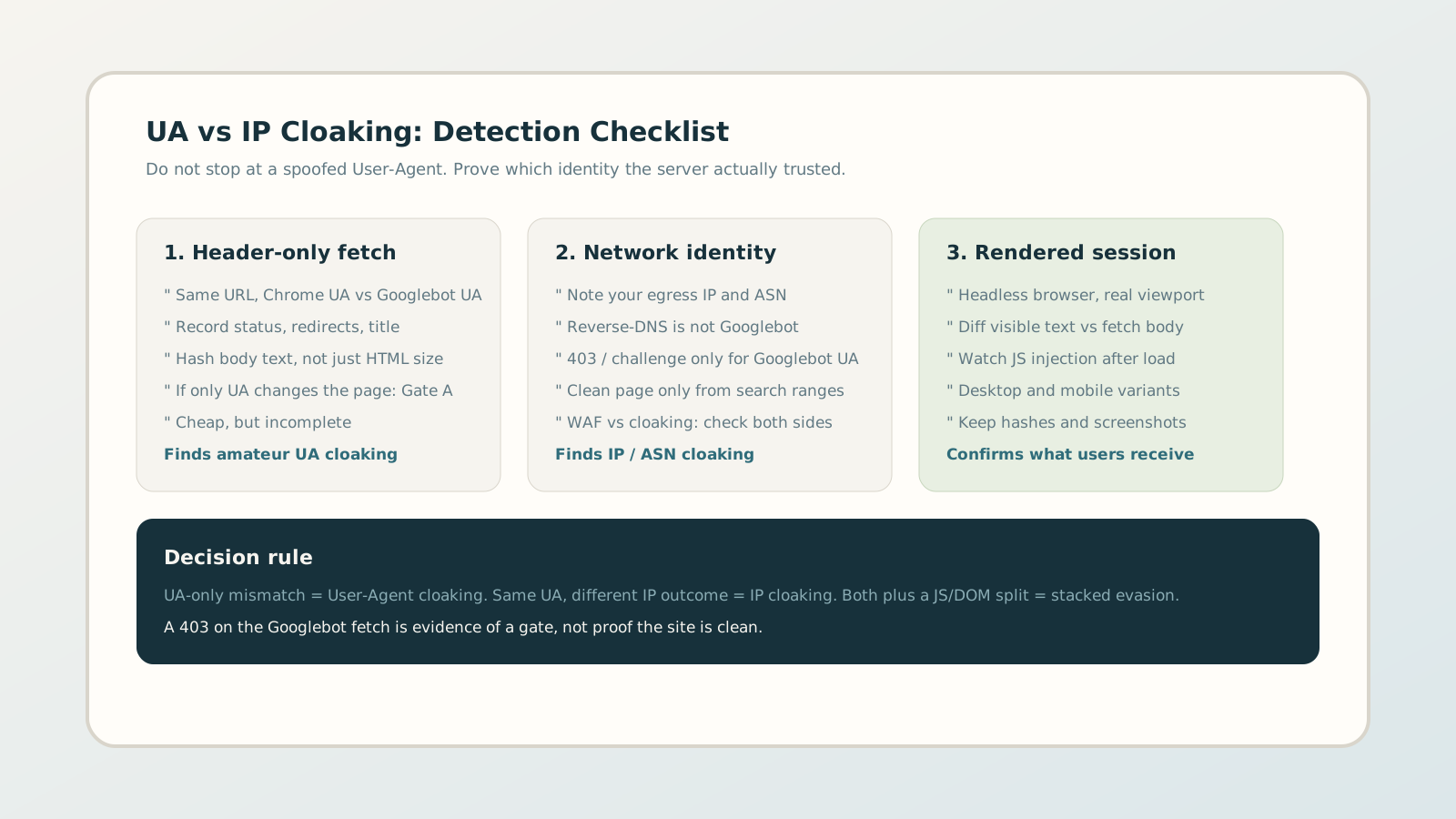
Step A — Header-only fetch
Same URL, Chrome UA versus Googlebot UA, from the same egress IP. Record status, redirects, title, description, and a hash of visible text — not just HTML byte size. If the page changes and the IP did not, you have User-Agent cloaking (or aggressive UA-based caching).
Step B — Name the network you used
Write down egress IP, ASN, and reverse DNS. You are not Googlebot. If the Googlebot-UA request returns 401/403/429 or an empty body while the Chrome-UA request returns a full page, you have evidence of an IP-aware gate. Label it “gate observed,” not “site clean.”
Step C — Rendered browser session
Fetch HTML is not what users see if JavaScript rewrites the DOM. Run a headless browser with a real viewport, then diff visible text against the raw body. Desktop and mobile both matter; sneaky mobile redirects are a separate pattern covered in sneaky mobile redirects.
Step D — Decide which gate fired
UA-only mismatch = User-Agent cloaking. Same UA, different outcome when the network changes = IP / ASN cloaking. Both, plus a JS/DOM split = stacked evasion. Keep the hashes, headers, and timestamps; they are the evidence you will need if Search Console later shows spam titles you never saw in the browser.
7. What “inconclusive” usually means
In dual-fetch tools, the most honest result is often not “cloaking” or “clean.” It is inconclusive: the crawler-shaped request and the browser request cannot be compared because one side never returned comparable HTML.
Common causes: HTTP 403 on the Googlebot-UA fetch, a challenge page, a zero-word body, or a WAF that blocks datacenter ASNs. Those outcomes are still useful. They tell you the server is branching on identity. They do not tell you the spam payload exists — and they definitely do not tell you it does not.
The fix is not to pretend a spoofed UA is Google. The fix is to add a rendered browser view, inspect WAF/CDN bot rules, and, if you have Search Console, compare indexed titles against what the browser shows. Indexed spam with a clean browser view is still cloaking, even when your curl test was blocked.
If a CloakScan report came back inconclusive, start here: what your result means.
8. Prevention for agencies and site owners
You cannot stop attackers from writing UA and IP rules. You can stop treating a header spoof as due diligence:
- Never close an incident on a User-Agent swap alone. Record IP, ASN, and status codes with every fetch.
- Treat “block fake Googlebot” WAF rules as expected noise for scanners, then verify users and Search Console separately.
- Inventory origin and edge rules that mention User-Agent, ASN, country, or “known bots” — with a named owner.
- Schedule crawler-versus-browser diffs, including a rendered session. Point-in-time curl is a screenshot, not monitoring.