Cloaking Detection • Continuous Monitoring
Why a Clean Cloaking Scan Is Not Enough: The Case for Continuous Monitoring
You paste a URL into a cloaking checker. The result comes back clean. That is useful information: for the page, request identities, and moment tested, the scanner did not find a meaningful split between what a visitor and a crawler received. It is also where too many investigations stop.
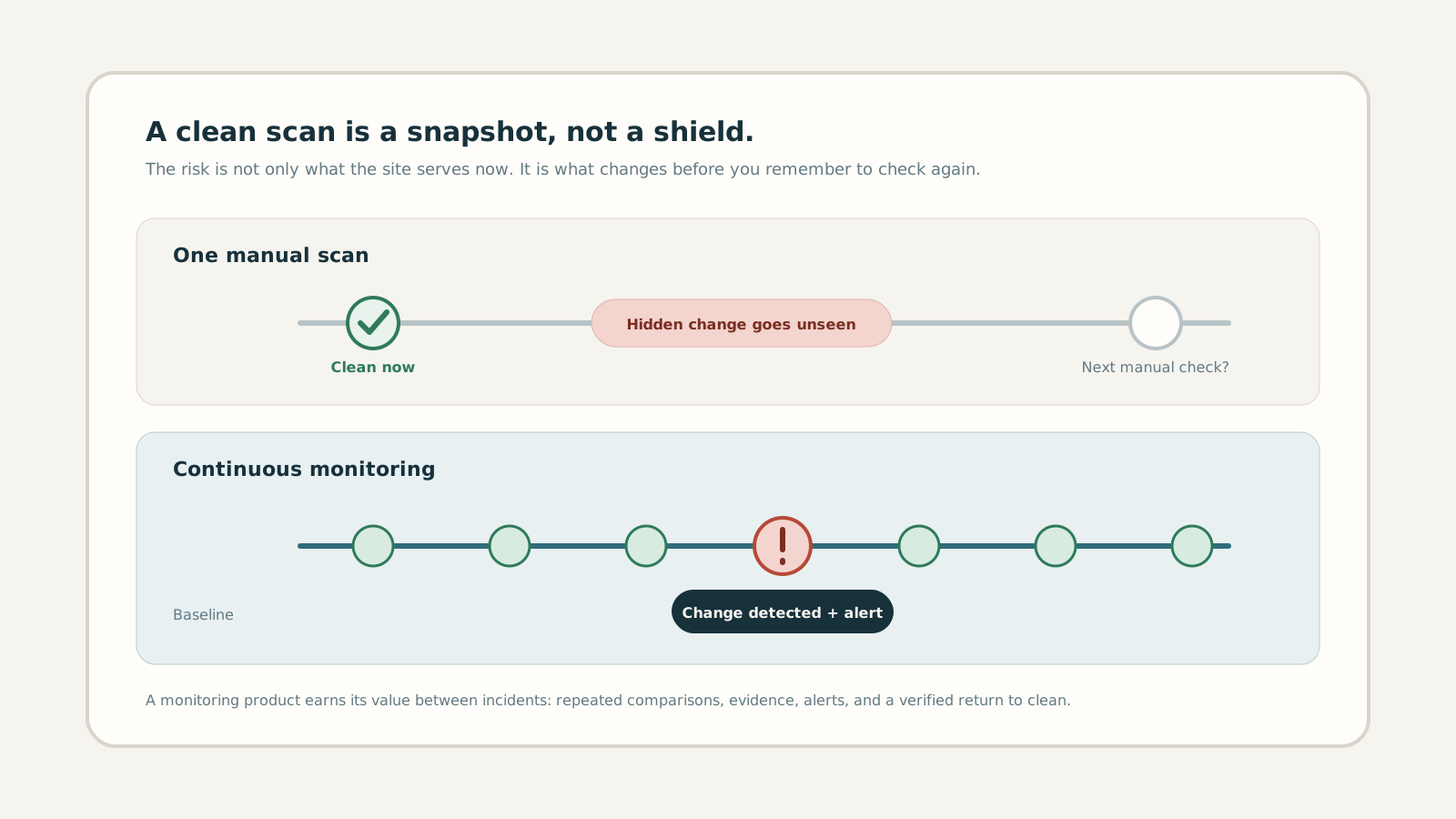
A clean result is not a warranty on tomorrow. Cloaking can activate on a schedule, target a specific device or country, sit on a hidden URL, or return after a compromised credential is used again. The practical difference between a checker and protection is what happens after the first green result.
1. What “clean” actually means
A responsible scanner makes a bounded claim. “Clean” means the responses it successfully collected were similar enough that no cloaking signal crossed the detection threshold. The verdict depends on the exact URL, time, network, User-Agent, viewport, and rendering method used.
That is not a weakness unique to cloaking tools. A blood-pressure reading, uptime check, or malware scan also reports an observed state. The mistake is turning an observation into a permanent guarantee. A clean homepage at noon says nothing about a spam doorway that appears at 2 a.m. or a redirect served only to mobile visitors in another country.
2. Cloaking is designed to avoid one-off checks
Attackers do not need to fool every test. They only need to keep the payload outside the slice you inspected. Common blind spots include:
- Time: spam activates for short windows, then disappears before office-hours QA.
- Identity: Googlebot, normal browsers, logged-in administrators, and scanners receive different responses.
- Network: IP, ASN, reverse DNS, or geography decides which payload is served.
- Device: mobile users are redirected while desktop QA and crawlers see the expected page.
- URL: the homepage stays clean while generated paths, subdomains, or old posts carry the attack.
We explain the identity problem in User-Agent Cloaking vs IP Cloaking and the device problem in our guide to sneaky mobile redirects. Both illustrate why repeating exactly the same manual request is not the same as widening coverage.
3. The real risk lives between scans
Imagine an agency checks a client site on Monday and gets a clean result. A stolen hosting credential adds a redirect rule on Tuesday. Google crawls it on Wednesday. The owner notices unfamiliar search results two weeks later and finally runs another check. Both manual scans may be honest; neither reduced the detection delay.
That delay matters more than scan volume. The useful security metric is time to detection: how long a crawler-only change can remain live before someone receives evidence and acts. Scheduled comparisons shorten that window. They also build a history that distinguishes a stable localisation difference from a new, unexplained divergence.
4. A scanner answers a question. Monitoring owns the outcome.
| Capability | One-off scan | Continuous monitoring |
|---|---|---|
| Current verdict | Yes | Yes |
| Baseline and history | Single point | Trend over time |
| Change detection | Only while running | Scheduled |
| Alert with evidence | No | When risk changes |
| Recovery verification | Manual recheck | Compared with baseline |
This is why “unlimited scans” is a weak way to describe a monitoring product. Customers are not buying button clicks. They are buying the confidence that something keeps checking when they are not looking.
5. What continuous cloaking protection should include
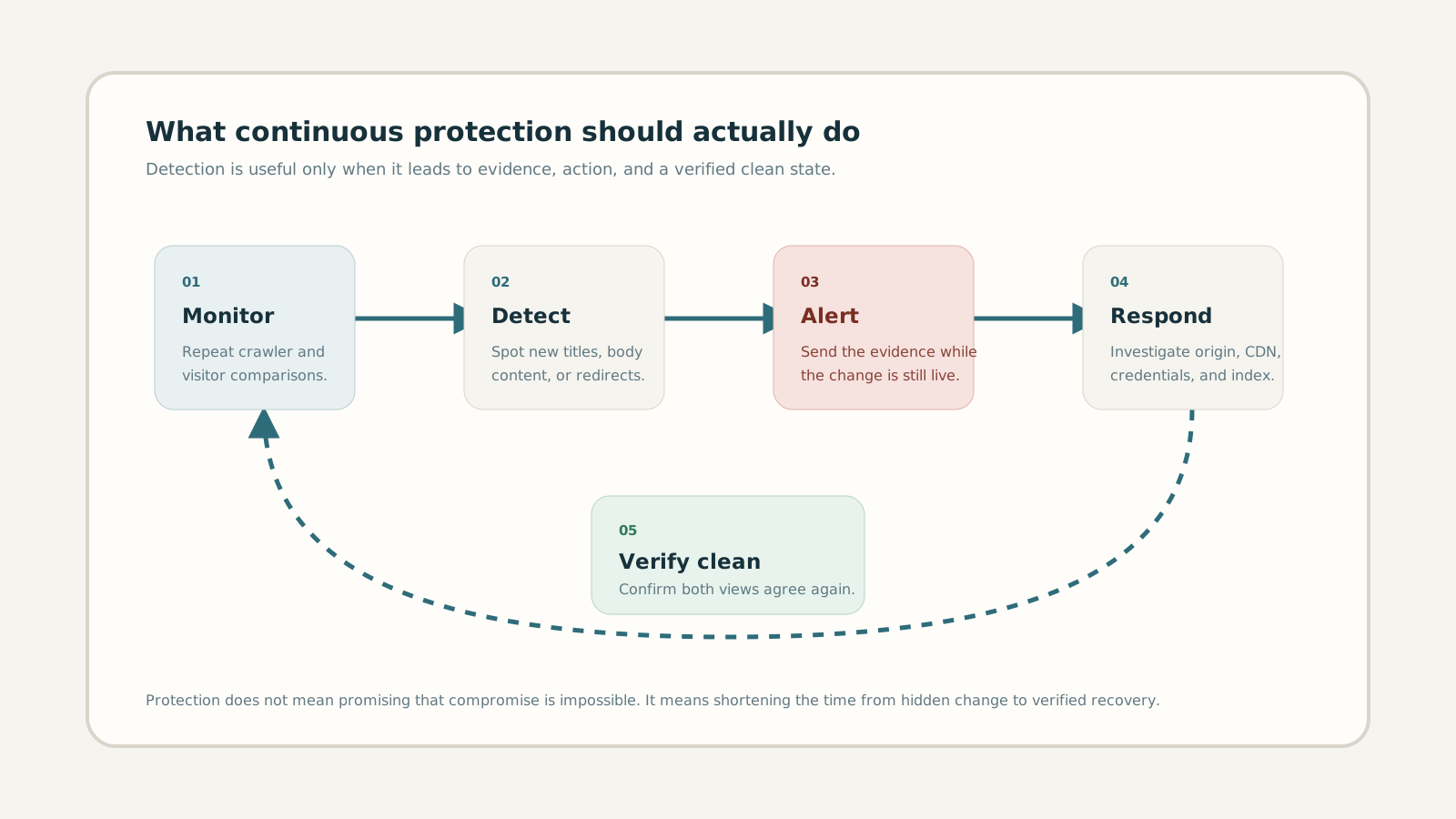
Protection must be an honest promise. An external service cannot prevent every stolen password, vulnerable plugin, or malicious edge rule. It can make a hidden incident much harder to leave unnoticed. A complete loop has five jobs:
- Monitor: repeat comparable visitor and crawler checks on a known schedule.
- Detect: identify new differences in titles, body content, redirects, status codes, and security signals.
- Alert: notify the right person while the suspicious response is still available to inspect.
- Respond: provide evidence and a focused investigation path across origin, CMS, CDN, credentials, and Google’s index.
- Verify: confirm that crawler and visitor views agree again after remediation.
6. Choose coverage based on risk, not anxiety
Not every site needs the same cadence. A small brochure site with few deployments may justify daily or weekly checks. Ecommerce, publishing, lead-generation, and client sites with recent incidents deserve tighter intervals. Run an additional check after deployments, DNS or CDN changes, plugin updates, credential resets, and cleanup work.
Coverage also means choosing representative URLs. Include the homepage, high-value landing pages, recently indexed paths, and any URL that Google shows with a title you do not recognise. For larger portfolios, watch forgotten hosts too; our subdomain SEO spam guide explains why a clean apex domain can hide a separate incident.
7. What to do when the result changes
Do not start by deleting random files. Preserve the suspicious URL, timestamp, response status, redirect chain, and both page versions. Confirm whether the difference is legitimate personalisation, a WAF challenge, or a harmful crawler-only payload. Then inspect the layer that could make that decision: application code, rewrite rules, CDN Workers, cache variants, and compromised credentials.
After removal, scan again and keep watching. Google may still show old spam while its index catches up, so separate a live payload from an indexed leftover. The workflow in Wordfence Says Clean. Google Still Shows Spam explains that distinction in detail.
8. When a free scan is enough, and when it is not
Create a free account to investigate a suspicious URL, establish a baseline, or check the visible results of a cleanup. Free includes one site and five manual scans per month, with browser rendering and saved scan history. Return to compare new results with that baseline. Choose a paid plan for scheduled monitoring and alerts when the site affects revenue, rankings, client trust, or contractual obligations; when nobody will remember to check manually; or when a previous compromise makes recurrence plausible.
The clean result still matters. It tells you where the timeline starts. Protection begins when that result is saved, compared, and allowed to wake someone up if the site stops behaving the same way.
Frequently asked questions
Does a clean cloaking scan mean my website is safe?
It means no meaningful cloaking signal was detected in the pages and contexts checked at that moment. It cannot guarantee that a payload will not activate later or target an untested device, network, location, or URL.
How often should a website be checked for cloaking?
Match frequency to business risk and site activity. Daily or weekly may suit a stable brochure site; high-value and frequently changing sites benefit from checks every few hours and after important changes.
Can continuous monitoring prevent cloaking attacks?
It cannot prevent every compromise. It reduces exposure by detecting hidden differences early, preserving evidence, alerting the owner, and verifying recovery after remediation.