Incident Response • WordPress Security
Wordfence Says Clean. Google Still Shows Spam: Why Plugin Scans Miss Cloaking
You already did the responsible thing. You ran Wordfence, Sucuri,
MalCare, or the host’s malware scanner. It finished green. You opened
the site in Chrome. The homepage looks like the client’s real business.
Then someone searches site:theirdomain.com
viagra — or Google Search Console still lists security issues —
and the spam is still there.
That is not a broken plugin. The plugin answered a different question. File scanners ask: “Do I recognise malware in the files I can read?” Google asks: “What did I get when I crawled this host?” Those answers diverge whenever the attack is cloaked, served at the CDN, or already sitting in the index from last month.
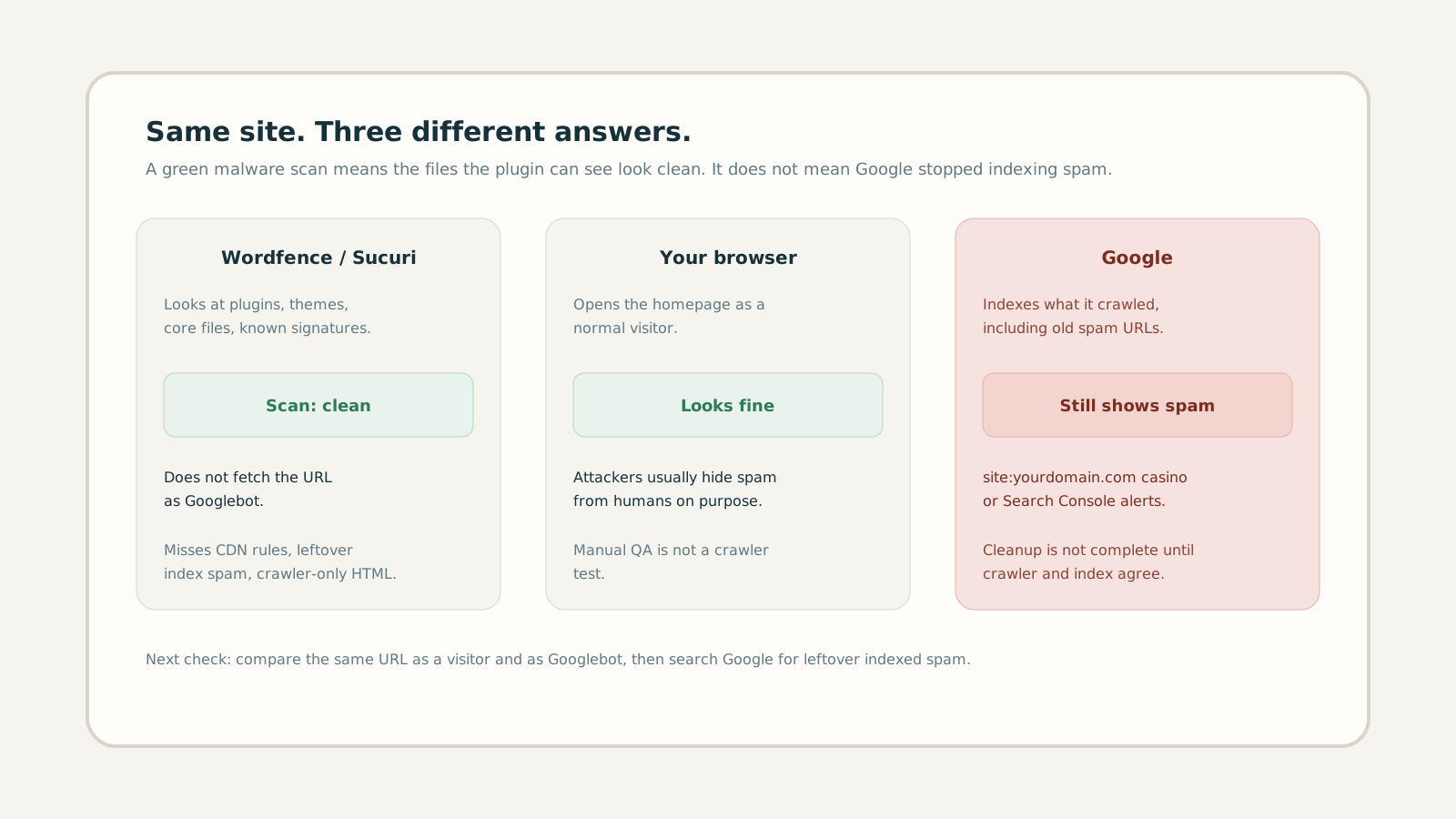
1. The cleanup that looked finished
This pattern shows up on freelancer maintenance contracts every week. A client forwards a Search Console email, a ranking collapse, or a screenshot of casino pages under their brand. You scan, you delete a rogue plugin, you reset passwords, you hit “repair”. The dashboard goes quiet. Two days later the same URLs are still in Google.
Wordfence and Sucuri are good at what they are built for: known signatures, modified core files, obvious webshells, infected themes. They are not a substitute for asking Googlebot what it sees. If you only re-scan until the plugin is green, you stop one layer too early.
2. Why the plugin and your browser agree — and Google does not
Cloaking is the usual reason. The server, a must-use plugin, an
.htaccess rule, or a Cloudflare
Worker inspects the request and chooses a response. A normal browser
gets the real site. A crawler User-Agent, a Google IP range, or a
mobile visitor gets spam. You never see it while you click around as
yourself. That is the point of the attack. We break down the mechanism
in
Google Sees One Site, Users See Another
and in
the pharma hack guide.
A malware plugin does not fetch your public URL twice. It does not render the page as a browser and as Googlebot. It does not walk Cloudflare Transform Rules. So the scan can be clean while Google’s index still lists spam URLs you never published.
There is a second, quieter case: the live payload is gone, but Google
has not recrawled yet. Then site:
still shows garbage even though a crawler fetch now returns 404. You
still have work — Search Console removals, sitemap, recrawl — but you
must not confuse leftover index entries with an attack that is still
serving HTML.
3. What usually survives a Wordfence or Sucuri pass
After a “clean” scan, check these layers before you tell the client it is over. None of them require dumping on the plugin. They sit outside its default field of view.
- 1 Must-use plugins and drop-ins.
Files in
wp-content/mu-plugins/orwp-content/object-cache.phpload without appearing in the normal plugin list. A scanner that only diffs the plugins screen will miss them. - 2 .htaccess and nginx maps. Mobile-only redirects and Googlebot branches often live here. The CMS admin looks untouched. See sneaky mobile redirects.
- 3 CDN / Cloudflare rules. Workers, WAF skip rules, and cache keys can rewrite HTML before WordPress runs. Origin files stay clean. Details in CDN and edge cloaking.
- 4 Forgotten hosts.
Staging, old
blog.and dangling CNAMEs keep serving spam while the apex looks repaired. Subdomain SEO spam is a separate incident on the same brand. - 5 Indexed leftovers. Japanese keyword hacks and pharma doorways can remain in Google for weeks after the file is gone. Treat recrawl as part of cleanup, not as proof the attacker is still live. See the Japanese index guide.
4. A 20-minute check that does not depend on the plugin
Do this on the exact URLs Google is showing, plus the homepage. Write the results down. You need evidence for the client, not another green badge.
-
Search
site:clientdomain.complus casino, poker, viagra, cialis, 日本語, and a random slug from Search Console. If titles you never wrote appear, the index is still dirty. - Open those URLs in a normal browser and in a logged-out window. If they 404 for you but rank in Google, either cloaking is still live for crawlers or the index is stale. You cannot tell which until you fetch as Googlebot.
- Compare the same URL as a visitor and as Googlebot — HTML, title, redirects, status code. A spoofed User-Agent alone is not enough when the gate is IP or ASN. That gap is explained in User-Agent cloaking vs IP cloaking.
- Check Cloudflare (or the host CDN) for Workers, Redirect Rules, and cache variants you did not create.
- Only then re-run Wordfence. Use it to hunt files. Do not use it as the verdict on what Google sees.
5. Clean the layer the scanner never saw
If the crawler still receives spam, deleting a plugin is not the fix. Remove the decision that splits responses: the mu-plugin, the rewrite, the Worker. Rotate every credential that could put a new rule back (WordPress, FTP, hosting, Cloudflare). Then request indexing of the real URLs and removal of the dead spam paths in Search Console.
Tell the client the honest sequence: files cleaned, crawler checked, index catching up. “Wordfence is green” is step one, not the closing email. If you stop at step one, the next Search Console ping lands on you anyway — two weeks later, with less trust.
6. After Google stops showing spam, keep watching
Reinfection is common when the entry point stays open: an abandoned plugin, a reused password, a Worker nobody owns. A single clean scan — plugin or otherwise — is a photograph. Cloaking that returns at 3 a.m. for Googlebot only will not show up in your next manual click test.
For maintenance retainers, the professional close is scheduled crawler-versus-browser diffs on the client host, plus an alert when titles, redirects, or body content diverge. That is the check the malware plugin is not going to start doing.